What Software Do Airbnb Superhosts Actually Use to Protect Their Rating?

Updated: Jun 2
Table Of Contents
What software do Airbnb hosts and superhosts use and why?
Ask most Airbnb Superhosts when they started taking their tools seriously and the answer is usually the same. It was after a review they did not see coming.

A 3 star rating from a guest who seemed perfectly happy at checkout. A comment about something small, a dripping tap or a slightly musty towel, that they never mentioned during the stay. By the time you read it, the damage is done and your Superhost status is suddenly looking fragile.
The hosts who consistently hold a 4.8 rating or above are not just better at hospitality. They are better at information. They know what guests are thinking before those thoughts turn into public reviews, they price their listing to stay competitive without guessing, and they have taken the repetitive admin off their plate so they can focus on the parts that actually affect the guest experience.
Here is the software stack that makes that possible.
Pricing: Staying Competitive Without Watching the Market Every Day
Airbnb's own smart pricing tool has a reputation for pushing rates lower than most hosts are comfortable with. The Superhosts who protect both their income and their review volume tend to use a dedicated dynamic pricing tool instead.
PriceLabs, Wheelhouse and Beyond are the three most commonly used. They pull in data from your local market, comparable listings, upcoming events and seasonal demand, then adjust your nightly rate automatically. The result is a listing that stays booked without being underpriced to the point where guests arrive with inflated expectations your property can not meet.
That last part matters more than most hosts realise. A mismatch between price and expectation is one of the quieter drivers of 4-star reviews on Airbnb. A guest who pays premium rates expects a premium experience. Getting the pricing right is not just a revenue decision, it is a guest experience decision.
Messaging: Hitting Airbnb's Response Rate Requirement Without Being On Call 24/7
One of the harder Superhost requirements to maintain is a 90% response rate within 24 hours. For hosts managing a listing alongside a full-time job or family life, that window closes fast.

Automated messaging tools like Hospitable, Hostaway and Guesty let you build out a full message sequence, booking confirmation, pre-arrival instructions, a check-in reminder, a mid-stay check-in message and a checkout prompt, that runs automatically for every guest without you lifting a finger. Your response rate stays healthy and guests feel looked after from the moment they book.
The mid-stay check-in message is worth mentioning specifically. Sending a simple "hope everything is going well, let us know if you need anything" on day two of a longer stay opens a door that most guests would not have knocked on themselves. Small problems get reported to you instead of saved up for the review.
Cleaning: The Part That Quietly Kills Superhost Ratings
Cleanliness is consistently one of the most common reasons guests leave a 4-star review instead of 5. It is also one of the hardest things to manage when you are not on-site to check the work yourself.
Tools like Properly, TurnoverBnb and Breezeway connect directly to your Airbnb calendar and automatically notify your cleaner when a checkout happens, generate a checklist for each turnover and let cleaners submit photo confirmation of completed tasks. For hosts managing more than one listing, this kind of system is not optional, it is the difference between consistent quality and an occasional disaster.
Guest Feedback: The Tool Most Hosts Only Discover After a Bad Run of Reviews
Here is the honest gap in most Airbnb host setups.
Pricing tools, messaging automation and cleaning coordination are all about operations. They help you run the listing. What none of them do is tell you what your guests actually experienced during their stay, in real time, before they leave a public review on Airbnb.
Think about how that feedback loop currently works for most hosts. A guest checks out, they get an Airbnb review request a few days later, and whatever they felt during the stay, good or bad, gets distilled into a star rating and a few sentences that are now permanent and public. You had no chance to fix what went wrong. You had no chance to encourage the guests who loved it to say so publicly.
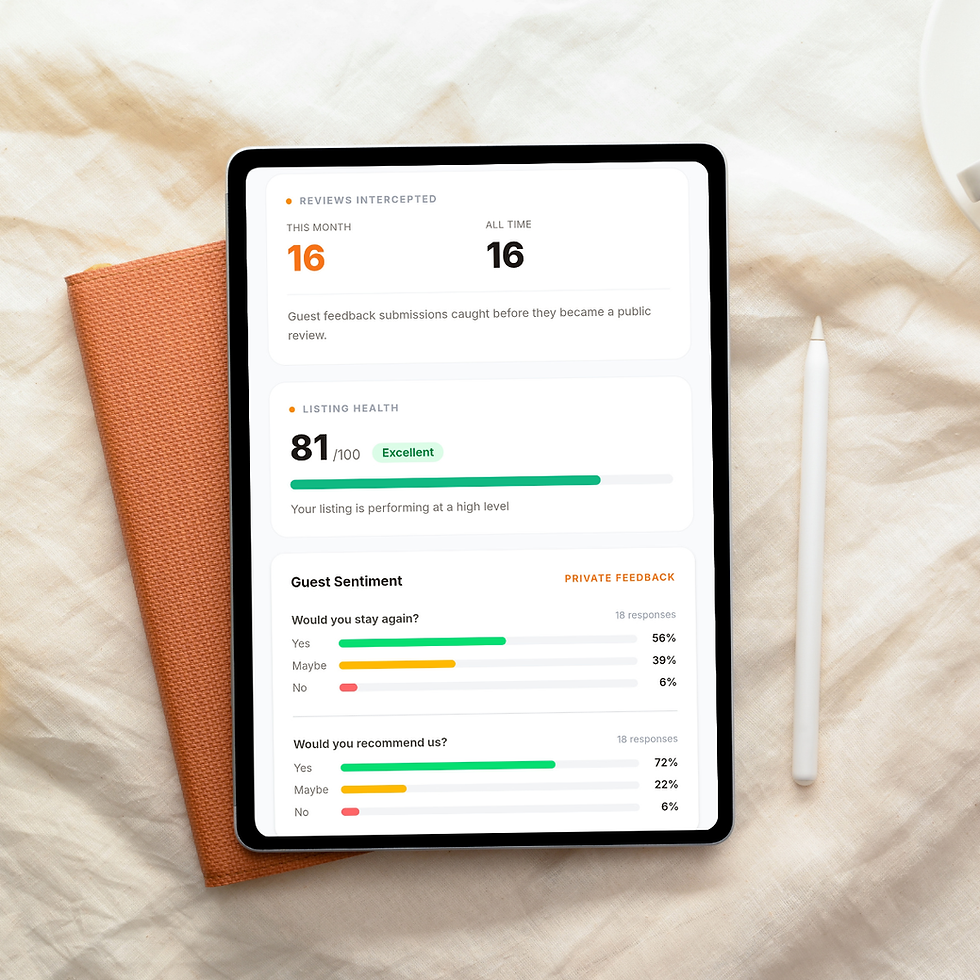
IntuitiveStay's HomeHost plan changes that loop. You get a QR code to place in your property. Guests scan it during or after their stay and leave private feedback through a short form. If their experience was positive, they are prompted to share a public review on Airbnb. If something went wrong, you hear about it privately first, while you still have a chance to respond, apologise or fix it before it becomes a review.

The HomeHost dashboard tracks your guest experience across four areas: Accuracy, Welcome, Responsiveness and Experience. These are the exact pillars that determine whether guests feel your listing matched what they expected, whether they felt welcomed, whether you were easy to reach and whether the overall experience was worth repeating. You can see trends over time, spot which area is dragging your score down and get ahead of problems before they show up in your public rating.
There is also a Superhost Tracker built into the dashboard. It shows you your current risk status based on your private guest feedback trends, not just your live Airbnb score. Hosts who use it describe it as having a warning system they never had before.
What Order Should You Build This Stack In?
If you are just starting out or working with a tight budget, you do not need all of this at once.
Get your pricing right first. It affects your booking volume, your guest expectations and ultimately your review quality. Then add messaging automation once you find yourself losing time to repetitive communication. Cleaning coordination becomes valuable once you are managing regular turnovers or working with a cleaner you can not supervise in person.
Private guest feedback is worth adding as soon as you have something to protect. If you are close to Superhost status, trying to hold it, or building a rating you have worked hard for, waiting until after a bad run of reviews is the most expensive way to discover you needed it.
How Much Does a Proper Host Setup Cost?
A solid stack does not have to be expensive. Most hosts spend:
- Dynamic pricing tool: from around £15 per month
- Messaging automation: from around £20 per month
- Cleaning management: free tiers available on most tools
- IntuitiveStay HomeHost plan: £27.99 per month, with a 30-day free trial included
For most hosts, one additional booking per month covers the cost of the entire stack. The more useful way to think about it is what a single prevented 3-star review is worth to your long-term booking rate.
Where to Start
If you already have pricing and messaging sorted, the highest-return thing you can add right now is a private feedback loop before your guests leave.
IntuitiveStay HomeHost includes a 30-day free trial. You can have your QR code live in your property before your next guest checks in.
Start your free trial here or take a look at the live demo without needing to register or give an email address so you can see exactly how the HomeHost can help you.

Comments